Reporch LMS
Create a classroom
Create an organization classroom with a clear name and description.
Overview
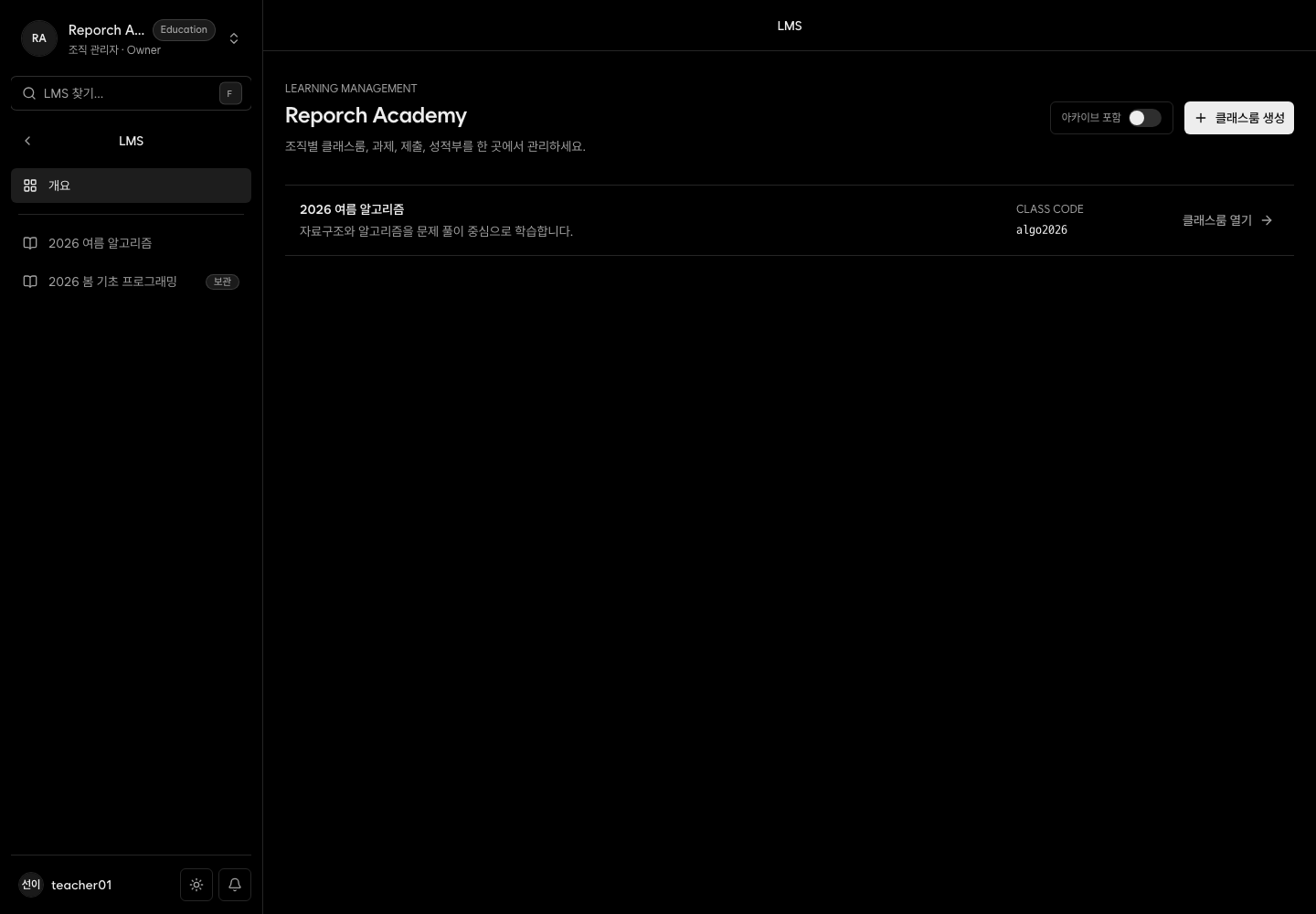
Organization owners and admins can create classrooms from the LMS home. The current dialog asks for name and description; the resulting classroom displays its generated identifying code.
Before you start
- Organization owner or admin access
- A name that distinguishes term, course, and section
- A short learner-facing description
Steps
1. Review existing classrooms
Open Organization Admin → LMS and make sure the course or section does not already exist.
2. Select New classroom
The action is available to owners and admins, not to a classroom instructor or TA role alone.
3. Enter name and description
Include section or term details that help both operators and learners identify the class.
4. Configure the result
Open the new class, note its code and status, add staff and learners under Members, and review Settings.
Expected result
- A new active classroom appears in the organization list.
- Opening it displays admin navigation and a unique code.
- Membership can be configured before content is published.
Troubleshooting
- No create action: Owner or admin access is required.
- Duplicate classroom: Archive the unused one and clarify the active name.
- Cannot choose the code: The current creation dialog accepts only name and description.
- Learners see it immediately: Creation alone does not enroll learners.