Reporch LMS
Read announcements
Review pinned, important, acknowledgment, and attachment indicators on classroom posts.
Overview
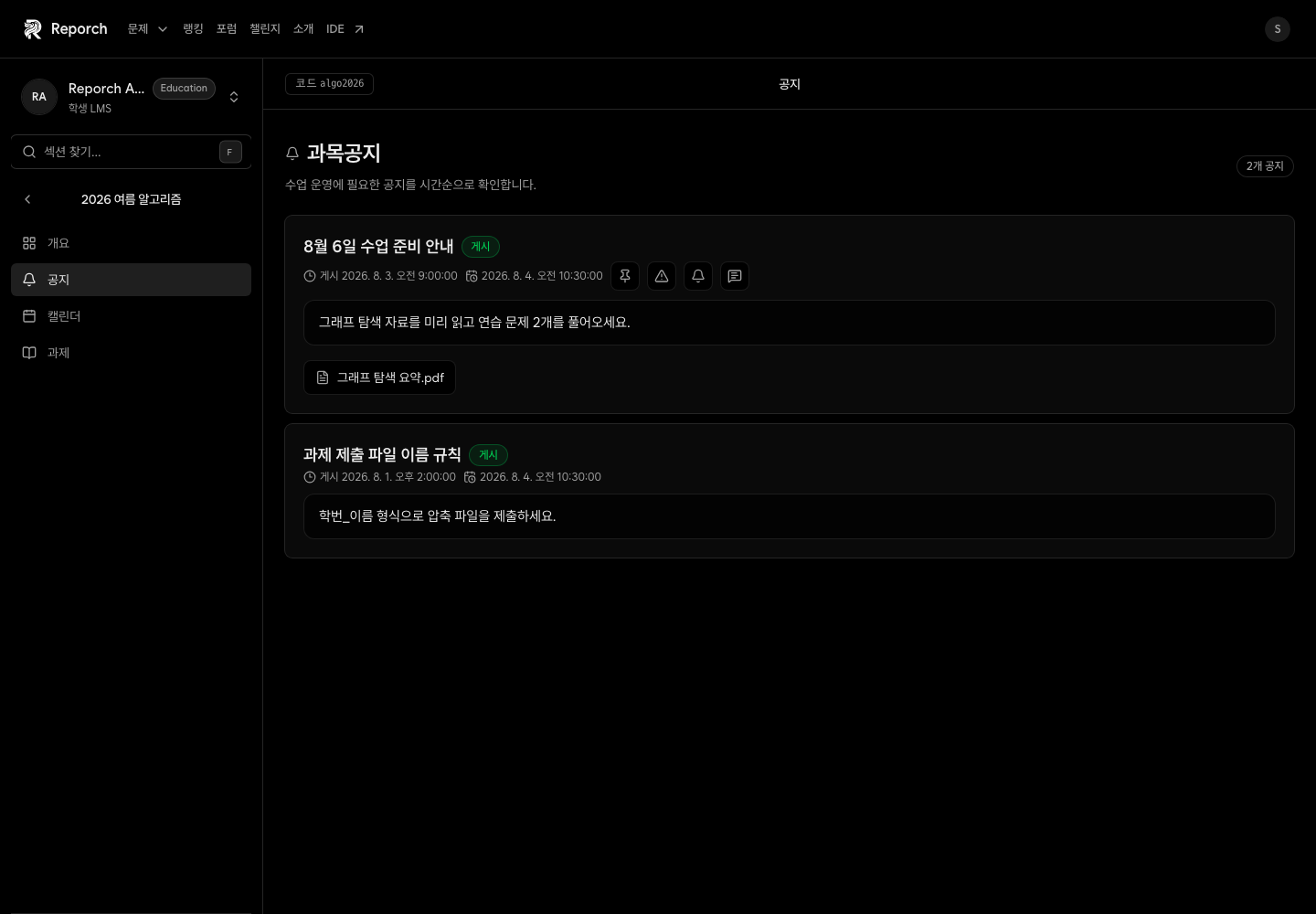
The Course Announcements page lists posts currently published to learners. A post can show pinned, important, acknowledgment-required, attachment, and reading metadata.
Before you start
- Active classroom membership
- An announcement published by an instructor or TA
- Browser permission to open downloads
Steps
1. Open Announcements
Select Announcements in the classroom navigation to see posts beyond the three recent items on Overview.
2. Check priority markers
Read pinned items first. Pay close attention to Important and Acknowledgment required markers. Scheduled items remain hidden until publication time.
3. Read the complete post
Review the title, body, publication time, and author. Cross-check deadline changes against Calendar and the assignment itself.
4. Open attachments
Verify the file name before following its download link. Keep a local copy when the instructor requests it.
Expected result
- Published posts can be prioritized correctly.
- Attachments are not missed.
- Schedule changes are verified against their source pages.
Troubleshooting
- Expected post missing: Ask the operator to check status, schedule, and classroom.
- Attachment will not open: Allow the new tab or download and retry.
- No acknowledgment action: The current learner list may not expose a separate acknowledgment control.
- Unsure which version is current: Share the title and publication time with the instructor.