Reporch
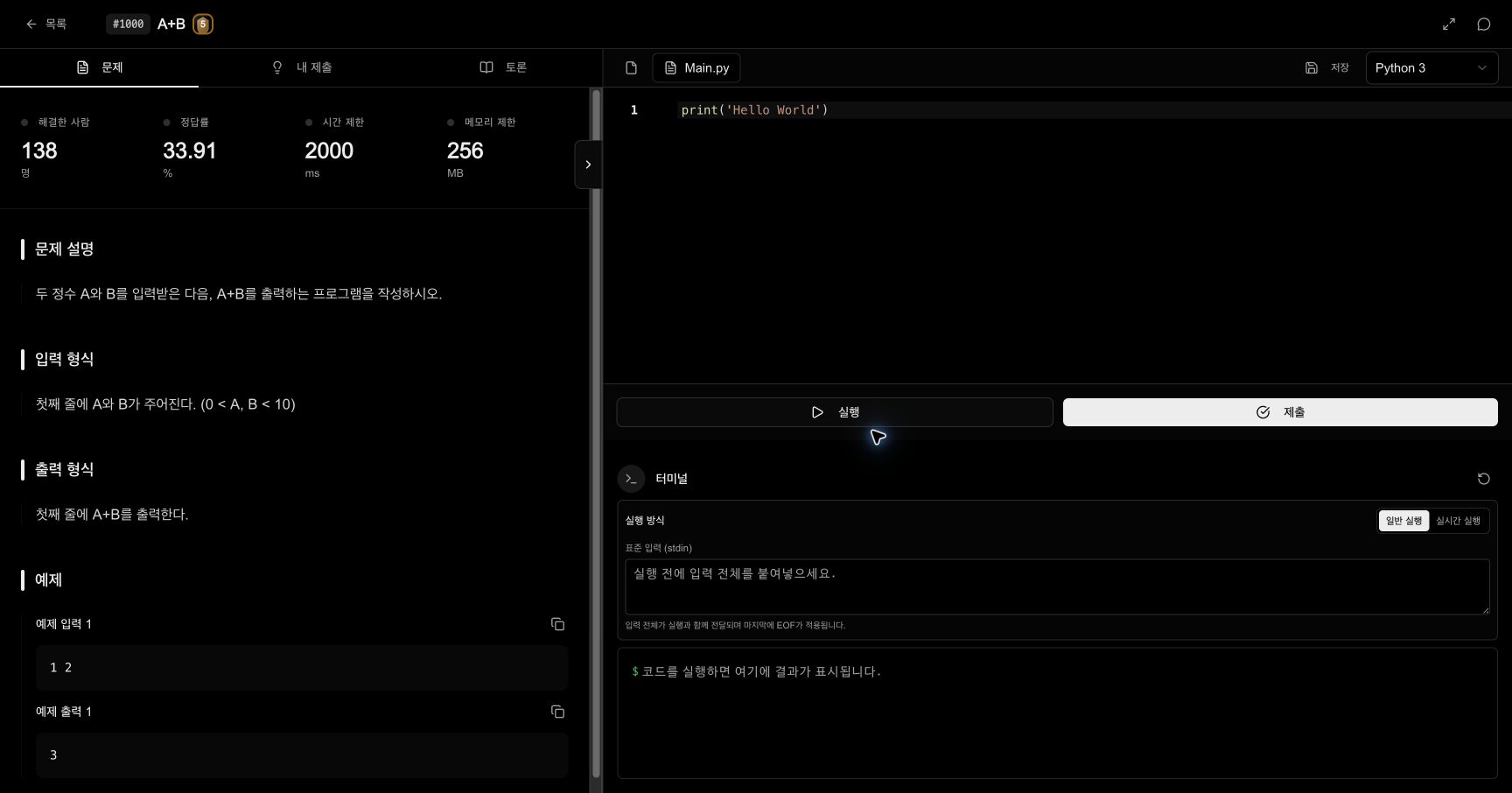
Run and submit code
Understand normal and live runs, then send one deliberate request to the judge.
Overview
Run tests how the current code behaves for input you provide. Submit sends the current runtime and source code to the judge and creates a permanent record. A successful run can still fail hidden judge cases, so treat these as separate actions.
Before you start
- Sign in to Reporch.
- Open the problem you intend to solve.
- Choose the correct runtime above the editor.
- Prepare example input and at least one case of your own.
Steps
1. Check language and code
Confirm the runtime and open file. If you changed languages, make sure the default file and syntax match the newly selected runtime.
2. Enter standard input
With Normal Run selected, paste all input into standard input (stdin). Reporch sends EOF after the final line, making this suitable for programs that read a complete input stream.
3. Run once
Select Run and wait for the request to finish. Output, compiler errors, runtime errors, and exit state appear in the terminal.
4. Compare exactly
Compare terminal output with the example character by character, including line breaks and spaces.
Use a live run
Choose Live Run when you need to send input interactively while the program is still running. Normal Run is easier to reproduce for most algorithm problems. If a live run does not finish, first check whether the program is waiting for more input.
Submit code
1. Check the saved state
Ensure the editor contains the version you intend to judge. For a multi-file solution, verify that every required file is present.
2. Test boundaries
Do not stop at the provided example. Try minimum and maximum values, conditional boundaries, and empty input only when the problem permits it.
3. Send one submission
Select Submit once. Do not click repeatedly while the request is being accepted. A successful request creates a unique ID in My Submissions.
4. Wait for the final state
Allow processing to finish. The final state can be accepted, partial, compile error, runtime error, time limit exceeded, memory limit exceeded, or wrong answer.
Expected result
- Normal Run displays output corresponding to stdin or a specific error in the terminal.
- One submission creates a unique record in My Submissions.
- Processing changes to an accepted state or another final state you can diagnose.
Troubleshooting
- Compile error: The first diagnostic location and the selected language
- Runtime error: Array bounds, division by zero, input conversion, and recursion depth
- Time limit exceeded: Complexity, termination conditions, and unnecessary repeated work
- Memory limit exceeded: Large arrays, caches, copies, and recursive stack use
- Wrong answer: Boundaries, numeric types, ordering, spaces, and line breaks